Portia gives fashion and apparel brands one place for project management, covering both internal projects and work with external partners such as agencies, while keeping business-sensitive data private.
Most brands run projects across email threads, shared drives, chat apps and spreadsheets. Product development lives in one tool, the marketing campaign with an agency in another, and decisions get lost somewhere in between. When a new person joins, they have to dig through old emails to catch up.
In this post we walk through how project management works in Portia. Watch the video below, or read on for the full breakdown.
Internal and external projects in one place
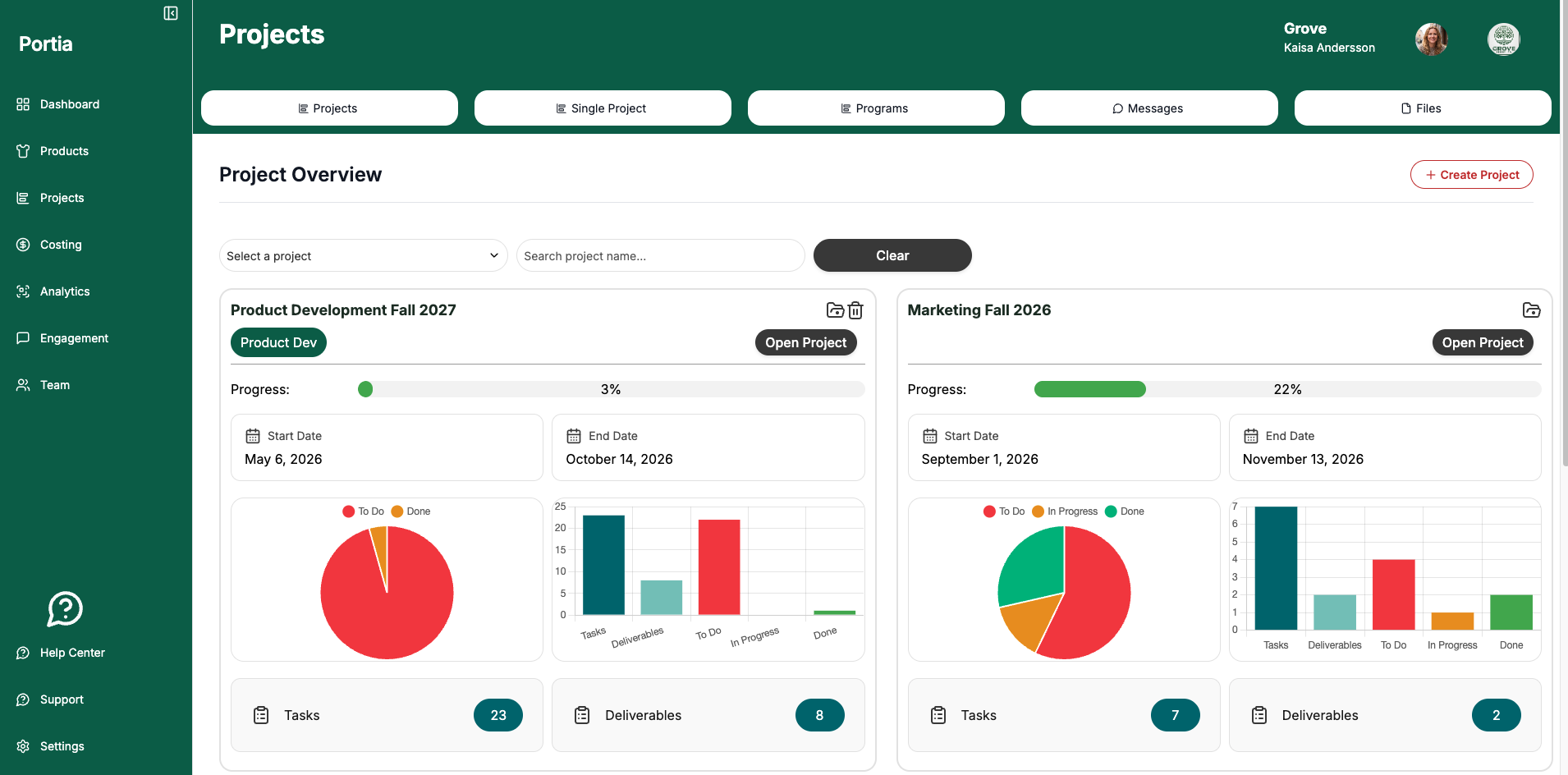
Portia handles both kinds of projects a brand runs. Internal projects can be general projects or product development projects. External projects are set up for work with outside partners, for example a marketing campaign with an agency.
You can create an unlimited number of projects, so every collection, campaign or supplier initiative can have its own space.
Invite external partners without exposing sensitive data
External partners only see the project they are invited to. An agency working on your campaign sees the project’s tasks, messages and documents, but not your costing or product information.
Access is controlled per person. Internal team members can be given access to everything, while external partners see only the project-specific information you choose to share. That lets you collaborate openly without worrying about what an outside party can see.
Timelines, tasks, statuses and approvals
Every project has its own timelines and deadlines. Tasks can be assigned to anyone on the project, internal or external, and you can follow each task’s status at a glance.
Approval functions log the decisions made along the way. When questions come up later in the project, you can see what was approved and avoid repeating the same discussions. Everyone knows what to do and what has been agreed.
Project messaging instead of email threads
Each project has its own messaging board, similar to Slack, with project conversations and direct messages. All communication about the project stays in the project.
When you invite a new member, they get the full conversation history. No more forwarding long email chains or briefing people from scratch. External partners only see the conversations in the projects they are part of.
Shared documents with version control
Projects include a shared space for documents. Files are version controlled: when someone uploads a new version, the history of earlier versions is kept, and any version can be downloaded.
Document access follows the same rules as the rest of the project, so external partners only see the files shared in their project.
Frequently asked questions
Can I invite external agencies and partners into Portia?
Yes. You can create a project and invite external parties, such as a marketing agency, together with your internal team members.
Will external partners see my costing or product data?
No. External partners only see the project they are invited to, not business-sensitive costing or product information.
Can I use Portia for product development projects?
Yes. Internal projects in Portia can be general projects or product development projects.
Does Portia replace email and chat for project communication?
Each project has a Slack-style messaging board with conversations and direct messages, and new members get the full history when they join.
Are shared documents version controlled?
Yes. Every upload keeps the file history, and earlier versions can be downloaded.
How many projects can I create?
There is no limit. You can create an unlimited number of projects in Portia.
See it in action
Want to see how Portia can bring your internal and external projects into one place? Book a short demo and we’ll show you how it works for your team.